
Data Lifecycle Management: A Complete Protection Guide
- Apr 2
- 6 min read
Most organizations don't struggle with data protection because they lack tools. They struggle because data doesn't behave the way it used to.
Data today moves constantly — created, replicated, shared, analyzed, retained, and reused across systems. It rarely lives in one place. That complexity creates risk.
Sophisticated cyberattacks don't always cause modern data incidents — most stem from far more common issues: accidental deletions, misconfigurations, broken automation, unauthorized sharing, over-permissioned users, sync errors, and unclear retention policies.
The strongest organizations reduce that risk by treating data protection as a lifecycle strategy, not a one-time implementation.
This guide covers the modern data lifecycle — what DLP does, and how backup, recovery, and retention work together to protect your organization.
What Is the Data Lifecycle?
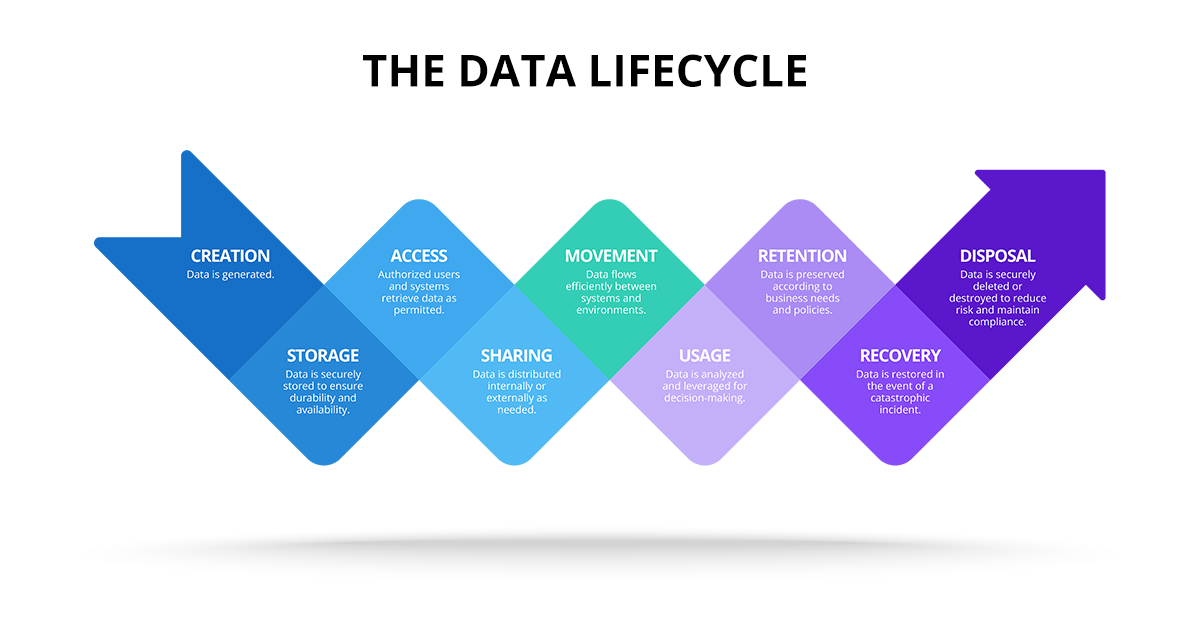
The data lifecycle covers the full journey of data — from creation to retirement. Most organizations move through the same core stages:
Creation
Storage
Access
Sharing
Movement
Usage
Retention
Recovery
Disposal
Each stage introduces different types of risk. No single tool protects every stage equally well.
Stage 1: Data Creation and Collection
This is where data enters your organization — from customers, internal teams, SaaS platforms, third-party systems, and APIs.
The risk: Teams often collect sensitive data unnecessarily, apply inconsistent formats, and leave ownership undefined. These early gaps create long-term data governance problems.
What strong organizations do: They define upfront what data they need, what they shouldn't collect, which data is sensitive, and who owns it. Intentional data creation makes every downstream stage easier to protect.
Stage 2: Data Storage
Collected data typically lands across multiple cloud platforms and systems — often without a coherent strategy.
The risk: Data spreads across disconnected platforms with inconsistent encryption and limited visibility into where sensitive information actually lives.
What strong organizations do: They treat storage as a governance decision. They establish approved storage locations, consistent encryption policies, and auditability standards. This is a core building block of enterprise data protection.
Stage 3: Data Access
Most sensitive data exposure traces back to access granted too broadly, too permanently, or without oversight.
The risk: Permission sprawl, overused admin roles, unrevoked contractor access, and weak identity controls all open the door to exposure.
Best practice: A modern data protection strategy enforces role-based access control (RBAC), least privilege policies, multi-factor authentication (MFA), and conditional access rules. No DLP tool fully compensates for poor access controls.
Stage 4: Data Sharing and Collaboration
Modern teams share data constantly. Sharing is necessary — uncontrolled sharing is one of the fastest ways sensitive data leaks.

The risk: Public sharing, anonymous links, external access without expiration, and sensitive data leaving approved domains all create serious exposure.
Where DLP becomes essential: This is where data loss prevention provides the most direct value. DLP detects and stops unauthorized file sharing, risky attachments, sensitive data transfers, and policy violations across cloud and endpoint environments.
Stage 5: Data Movement Between Systems
This is one of the most underestimated stages of the data lifecycle. Data flows constantly between systems for operations, reporting, analytics, and customer visibility.
The risk: Sync errors silently spread bad data. Automations overwrite records. Field mapping changes create downstream issues. Systems drift out of alignment without anyone noticing. Many data incidents don't look like breaches — they look like systems gradually becoming unreliable.
What strong organizations do: They treat data movement as part of their broader data protection strategy. That means controlled replication, validation workflows, and continuous monitoring of system-to-system consistency.
Stage 6: Data Usage and Analytics
Data only creates value when organizations use it — for reporting, forecasting, customer insights, automation, and AI initiatives.
The risk: The more data your organization uses, the more it spreads — and that spread creates risk. Analytics environments can accumulate restricted data, reporting datasets often have overly broad access, and query permissions frequently go unreviewed.
Best practice: Treat analytics data with the same seriousness as production systems. Apply governance controls, audit logging, and defined access rules to every reporting environment.
Stage 7: Data Retention and Governance
Retention is where many organizations quietly lose control. Systems accumulate years of historical records that become both compliance assets and growing exposure risks.
The risk: Teams keep data longer than necessary, apply unclear retention rules, leave sensitive data accessible indefinitely, and lose the audit trails needed to prove compliance.
Best practice: Define what data you must retain, how long to keep it, where it lives, who can access it, and how you monitor that access. Retention isn't just a compliance requirement — it's a core part of data protection.
Stage 8: Backup and Recovery
This is where preparation meets reality. Many organizations have backups. Far fewer have confidence in recovery.
The risk: Unclear restore procedures, slow recovery workflows, undefined recovery targets, and untested backup processes leave organizations exposed when incidents occur.
The two metrics that matter:
Recovery Time Objective (RTO): How quickly can you restore operations?
Recovery Point Objective (RPO): How much data loss can your business absorb?
If your organization can't answer both questions clearly, your strategy isn't recovery-ready.
Best practice: Treat backup as operational resilience, not storage. Design it to support real business recovery.

Stage 9: Data Disposal and Retirement
Every lifecycle ends. When systems retire or data is no longer needed, organizations must remove it safely and confidently.
The risk: Data lingers in forgotten systems. Old environments stay accessible. Teams can't prove deletion or demonstrate compliance alignment.
Best practice: Maintain a documented approach for retiring systems, removing access, validating what data remains, and preserving compliance proof.
Where DLP Fits in the Data Lifecycle
DLP is a critical layer of modern data protection — covering access controls, endpoint activity, cloud file permissions, and policy enforcement.
But DLP doesn't solve every lifecycle risk. It cannot restore data after accidental deletion, corruption, system failures, overwrites, or sync issues.
That's why DLP works best when paired with strong backup and recovery workflows.
The Most Resilient Strategy: Prevention + Recovery
The strongest organizations don't choose between prevention and recovery. They build both.
DLP reduces the risk of exposure. Backup and recovery reduce the impact of loss. Together, they form a complete data protection strategy.
Data Lifecycle Checklist
Use this to assess your current maturity:
✅ Do we know where our most sensitive data lives?
✅ Do we have clear data ownership and classification?
✅ Do we enforce least privilege access?
✅ Do we require MFA and conditional access controls?
✅ Do we restrict external sharing by default?
✅ Do we monitor data movement between systems?
✅ Do we have retention policies aligned to compliance?
✅ Do we know our RTO and RPO targets?
✅ Have we tested recovery workflows recently?
✅ Do we have a plan for data retirement and disposal?
If several answers are unclear, your data protection strategy has gaps worth closing.
Where Sesame Software Fits In
Sesame Software helps organizations take control of business-critical data across connected systems. That includes cross-environment visibility, controlled data replication, long-term retention strategy, and recovery workflows built for real-world incidents.
We focus on the parts of the data lifecycle where business risk is highest.
Data Protection Requires Lifecycle Thinking
Modern data environments are too complex for single-purpose solutions. Strong organizations build strategies that cover the full lifecycle — how data is created, where it lives, how it moves, how long it's retained, and how fast they can recover it.
That's what modern data lifecycle management looks like.
Ready to strengthen your data protection strategy?
Map your lifecycle, identify the gaps, and talk to a data expert about a strategy built for modern systems.
Data Lifecycle Management FAQ
What is the data lifecycle?
The data lifecycle is the process data follows from creation and storage through usage, retention, recovery, and eventual disposal.
Why is the data lifecycle important for data protection?
Because each lifecycle stage introduces different risks. A complete strategy includes prevention controls like DLP and recovery planning through backup and restore.
How does DLP support the data lifecycle?
DLP helps prevent sensitive data from being accessed or shared improperly during access, sharing, and cloud collaboration stages.
What is the difference between DLP and backup and recovery?
DLP focuses on preventing data leakage and policy violations. Backup and recovery focuses on restoring data after deletion, corruption, or system failures.
What do RTO and RPO mean?
RTO is how quickly you need to recover operations. RPO is how much data loss you can tolerate before business impact becomes unacceptable.
Found this post helpful? Share it with your network using the links below.

